
Facebook launched it’s new timeline feature, a format that I as a blogger loves very much. Add color to what I felt Facebook lacked before. Now everyone is adding cute little covers to their pages. I wanted to share how to create one using my memories software. When you first open your My Memories Software you will select “design your own” for album. Then select the landscape option, and change the size to 850 pixels by 315 pixels. It will look like this.
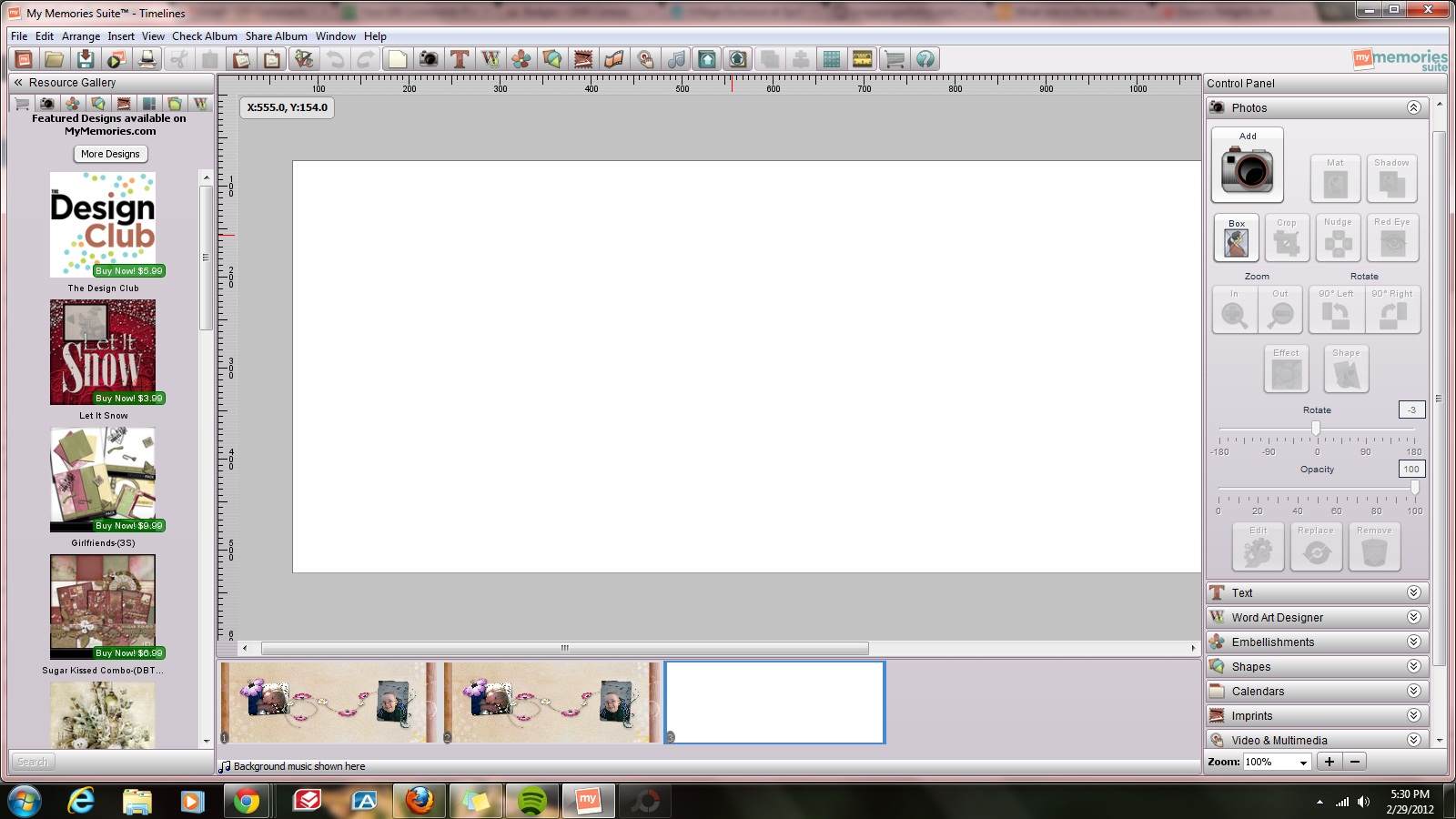
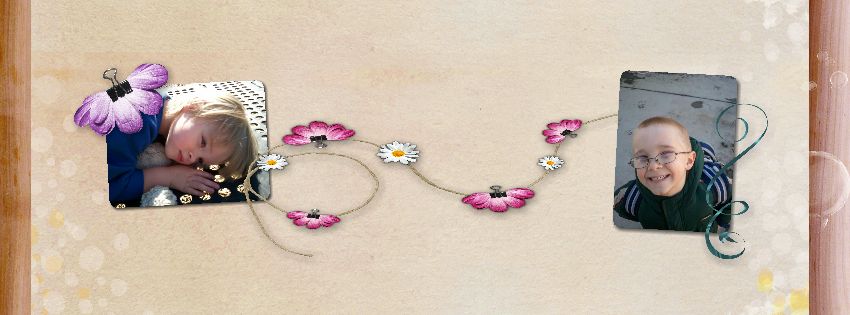
Once you have selected the size, you can then place in the background papers, elements and photos just as you would with any normal layout, re-sizing as needed. Here are couple I created today.


get a $10 Discount on MyMemories v3 software using our promo code STMMMS36408.
Share this:

I have the my memories suite, great idea for creating a facebook timeline. I think I’ll do that for my fan page!
My sister used to be an avid scrapbooker, she had supplies out the wazoo to create her beautiful masterpieces. With time at a premium these days, she recently discovered digital scrapbooking. A wonderful and very much less expensive way to preserve those family memories. I cannot wait to try your idea of scrapbooking for my facebook cover!
I don’t have the timeline on my personal page, but just saw that business pages will now have them- I guess I’ll have to learn something new 🙂 Thanks for sharing the info- I’m not familiar with this software.
When I tried to comment, it said it was a duplicate comment… This comment is a trial to see if the comments are working…
Ugh! Sorry, now my other comment showed up as well 🙂 I had a baby a few weeks ago- can I blame it on sleep deprivation?!
It’s ok, technology is tricky sometimes.
Interesting – I had seen the timeline feature, but didn’t know much about it – thanks for sharing!
Interesting! Thanks for the tips. I love to scrapbook both with the real paper & glue, and more recently with digital programs. But I have yet to like the new FB feature, because while I like scrapbooking, I also love organized, chronological data, clean lines, etc. The new FB seems too confusing and out of order.
Great informative post. I am looking forward to the timeline feature for my fanpage on facebook. Nice blog:)
Thanks for sharing about how we can make more out of our Facebook pages. I was playing with my pages yesterday. I’m not familiar with My Memories software, but it looks like you can do some great things with it.
You have a visually lovely blog. I love your wallpaper.
I didn’t even know this software existed. Pretty cool. Great idea for a blog! Starting to get interested in genealogies. My sister has been working on our family and found a lot of interesting things about my grandma’s family.
Nice to know a decent layout can be made using the memories software.
I am not too sure if I am ready to switch to timeline on fb yet though.
I just enabled the timeline thing on my facebook account last night, and I use My Memories for digital scrapbooking. Can’t wait to try this!
Digi scrapping is really money saving and yet creative…. you have done a very good work..Thanks for sharing
I am not a fan of the new Facebook timeline but this is too cute. I may have to try this. I will be bookmarking to come back.
Stopping by from the 100 Comments event.
http://www.AsToldByLisa.com
Wow, had no idea this was available. Such great ideas.
I never thought of using My Memories to make a time line photo! Great idea, thanks!!
I have been thinking about paying a designer for my personal and fan page timeline cover…now you have me thinking twice! The covers you made are beautiful 😉
Thanks for sharing. I’ve been hearing quite a bit about My Memories and now think I should consider trying it out!
You’re so very creative. I’m not in love with the timeline feature, but should I decide to commit, I know exactly where I’d come for design advice. Lovely images.
Peace and good to you.
Cute! I can’t wait to make mine thanks for sharing!
I don’t have this software. I wondered how everyone was making the cute covers. Now I know of at least one way. Gonna have to figure out something for my pages…..
this is too cute. I bookmarked your page so when I have more time I can create something so beautiful for my timeline on facebook as well.
I am resisting the change to Timeline but I know I won’t have a choice soon, it will be forced on us like all of the other changes so far 🙁 I don’t have My Memories but if I win it in a giveaway I will try this out, thanks for sharing 🙂
Beautiful! I need to do on for my fanpage. I tried using my blog header but it won’t size it right. I’m hoping I don’t have the same problem when I do a picture just for the timeline.
Nice tips! I just saw that the timeline was going to happen. My oldest daughter has become interested in doing our geneology. It’s fascinating to find out past stories.
I use my Creative Memories software to do this all the time – especially to create my header for my blog! The only thing that is different is that I set it up to make a 4×6 card and then make it a standard picture size and save it as a jpeg to put into anything that will take a picture! Lovely!
Very pretty! I didn’t know that you could use creative memmories software for your blog. I’ll have to try that!
Beautiful timelines! Love the idea.
It’s nice to know there are other options out there for FB timeline. I have been fighting it for some time but know I have no choice now, this is a great idea to check out.
Stephanie
http://www.royalmajestea.com
Beautiful! I need to make my own for personal and business. Now I can try it.
Nice post I have that software and will give it a try. Haven’t looked at that feature yet.
Over from blogelina, http://www.esavingsblog.com
Those are super cute! I’ve kind of fallen out of scrapbooking, but I can totally see how My Memories can help bloggers! Awesome tutorial!
That’s a nice cover. Do you have to have buy this software?
Thank you so much! I am about to move my blog FB page to timeline but wanted to make sure I explained it to my fans first.
Oh wow – thank you! I was wondering HOW people did stuff like that. I have a couple digiscrap software programs and I should try to do something like this!
Thank you SO MUCH! I don’t have time to study all this stuff and your directions are simple and easy to follow. Now I don’t feel so lost. Thanks again. Great and timely post. Deb
It’s always good when somebody clears things like this out. I like following simple steps. I’ll try it out . Thanks.
I appreciated your comments above (and I peeked at several of your other posts/designs!). I have heard lots about My Memories, but I have been using Photoshop Elements 8 for a couple years for all I do with digital scrapbooking and photo restoration. I’ve been wondering what to do for my FB header when it changes and now I think I’ll explore the possibilities…
Lynden
http://aneleganttouch-lynden.blogspot.com/2012/02/100-comments-event-wwwblogelinacom.html
https://www.facebook.com/pages/An-Elegant-Touch-/162889457132788
Thanks for sharing. I don’t know if I like the new timeline yet…
I have never done digital scrapbooking. I prefer paper myself so I don’t have software like this but it definitely gets me to thinking about creating a better photo for my timeline. Cute ideas.
It looks great! I would like to get more into that, I think I just need some software! Do you recommend one over another, and have you tried photoshop (we are considering buying photoshop).
I would LOVE to have this software! Usually I create with Photo Shop but would love the beautiful art on the different page designs. Plus, I have 3 small children that I would love to scrapbook for but just never started.
Oh, that’s a great idea! I think this the first time Facebook has made an update the profiles I didn’t hate – I actually really loved it! It does take a little time getting used to the new navigation on your page though. But it is gorgeous!
I knew about the facebook changes but I’m not as creative as you. I wasn’t even aware of the My Memories software.
Every time I learn a new social media…they change something and I have to relearn something else. And, for someone who is kind of new to all of this, it can be overwhelming. 🙂
Thank you for providing the info…maybe I will be able to do this. 🙂
Here from 100 comment event…hope you will visit my blog: http://www.viviankirkfield.wordpress.com
How helpful, thanks for the post!
Wow! Those came out really great. I didn’t know this program even existed!
Thank you, digital scrapbooking is a really handy tool with so many features.
I’m resisting changing to timeline until facebook forces me to. 🙂
Timeline is much like 5th Grade History when the teacher had you draw a timeline of your life. It can be confusing, and take time to get used to. At least your page can look pretty til the next change 🙂
Wow I didn’t know we could do that on MyMemories!
It is an amazing program that has so many features. I just posted on how to make candy wrappers.
I didn’t even know this was available. Thanks for opening my eyes.
You’re welcome, I am glad I could help you.
This is a pretty cool idea! Looks awesome!
Thank you for visiting my blog.
Cute! I’ll have to update mine.
Hi, I found you via MBC and am following you. Lovely blog, hope you will do the same!
Your timeline layout is awesome, so pretty. I have a FB page and my personal FB account. Would love to spread some of your designs around FB. Love them!!
Thank you, if you need a timeline cover made, just let me know.
I have memory suites too and never thought of using it for facebook. What a great idea! Thanks for the tip!
You’re welcome, thank you for visiting my site.
Thank you, I learn more about My Memories each day. They have a custom items shop where you can showcase your work. And my blog header was made using my memories suite.
These are beautiful! I didn’t even know you could do this! What a great idea. I’m visiting from vB!
~Erin
Thank you Erin for visiting my site.
What a marvelously clear walk-through of how to personalize the new timeline page covers on Facebook! I haven’t used Memories software before – going to go check it out as it sounds like one of those must-haves!
Thank you for visiting. The more I work with My Memories the more uses I find for it. I also created the header and blog background with the software.
Great informative post.I knew about the facebook changes but I wasn’t even aware of the My Memories software.
These are really cute! Though it took a little getting used to in the beginning, I really love the new timeline design on Facebook, and being able to customize one’s wall with a unique cover picture is just another added plus!
Thank you for visiting my blog. I really enjoy that timeline allows users to add that personal touch to their page. It was something I enjoyed on other sites and was really happy that they heard us.
I’m still playing around with mine on what I want, but I agree that the pages look much better now, and this is a great little tool…thank you!
Thank you Courtney, it is fun to create new timeline covers 🙂
I luv your stuff! Hadn’t really considered a time line with art, but I’m looking at it now 🙂
Sharon from VB
MyMemories software looks so easy to use! I keep hearing all about it, but I’ve never tried it. Thanks for the great tips!
What a wonderful way to preserve memories. I like how it looks.
Hi, I am just stopping by to let you know that I nominated you for the Versatile Blogger Award! Please stop by Ms. MommyHH6 to claim your well-deserved prize and get more details. Have a fantastic day! http://msmommyhh6.com/?p=1528
Absolutely stunning! 🙂 You make it look so easy. 🙂