My memories

  • Cute Card Freebie

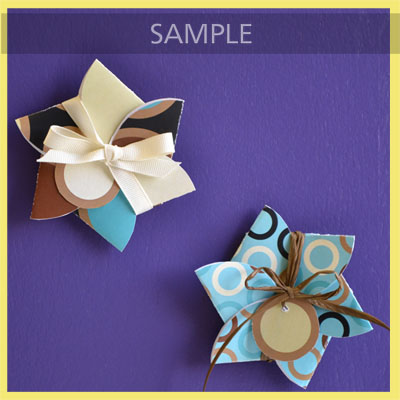
    My Memories has become my favorite software out of all the ones I have used. So many things that you can do with My Memories Software, this week freebie is a flower card template. 


    Flower Card Tutorial

    Using MyMemories Software to Customize your Flower Card

    1. Download template file and install it into your software
    2. Using MyMemories Suite, choose Create Album From Designer Template and find your project
    3. Now you can print and enjoy the provided template, or customize it with your own papers and embellishments.

    TIP:
    You can right-click on the white guide and lock it in place to keep it from moving while you are working. Make sure this is the top layer of your project before printing.

    Instead of adding the paper as a background paper, you can add it as an embellishment so that you can move the paper around.  This is especially useful when using papers with stripes or circles, so you can decide which part of the paper you want to use.

    Once it is added as an embellishment, you can now select the paper and move it into the position you want it.


  • Free My Memories Photo book

    Mother’s day is around the corner and My Memories is offering a beautiful photobook for free- only pay for shipping and handling. You can view this morning Lifetime Balancing Act introduction of My Memories this morning here.

    Creating these photobooks are easy, and a lovely way to preserve your memories. Using code BK6FRE will give you the free photobook, and using code STMMMS36408 will give you $10 off your purchase of My Memories Software v3 and an additional $10.00 for your first kits.


  • Giftbag Freebie


    This weeks My Memories Freebie is a cute little Gift bag template. You can always edit and add elements that you want.


    STEPS:  Open MyMemories Suite software and choose your album size (I chose 8.5 x 11 Landscape for a printable project).

    Add the papers and elements you wish to use to create your own printable project (I made these Gift Bags for a birthday bag), and when you are finished, click:

    SHARE ALBUM ====> EXPORT PAGES and save as a .jpg!  The new .jpg papers you created are now usable as stand alone printable projects to use and reuse anytime!  The Freebies enclosed are just samples of the printable projects you can make! Here is the edited bag I made tonight.

    Just print, cut, score, fold and use!  You can add ribbon for a handle and any other elements you wish. A great way to give a gift!!  Super easy, and perfect for any occasion.


  • Make your own Candy Wrappers

    STEPS:  Open MyMemories Suite software and choose your album size size chosen was 8.5 x 11 for a printable project).  Add the papers and elements you wish to use to create your own printable project, and when you are finished, click: SHARE ALBUM ====> EXPORT PAGES and save as a .jpg!  The new .jpg papers you created are now usable as stand alone printable projects to use and reuse anytime!  With Easter coming up these would be perfect additions to your celebration. 


    get a $10 Discount on MyMemories v3 software using our promo code STMMMS36408.

  • Timeless Love

    I really love this photo of my Grandparents. My Grandparents were divorced and as a young girl I would sneak into a little white trunk she had tucked under her bed with all her wedding photos. Never did she have any old photos of her and Grandpa out for view. At my last visit with my Aunt, we came across this photo of a very young Grandma with Grandpa. This was clearly before they had married in 1947, so they must of been courting at the time. Grandpa was a Marine during WII and quite the wild fly boy as we have gathered from earlier photos of him.

    I have used another layout kit from the Chocolate Valentine kit that Missy Bits Created. You can get her kit through her MyMemories store Missy Bits Designs.  Don’t forget to use Discount code STMMMS36408 for your $10.00 savings on the software and $10.00 off your digi scraps.


  • My Memories Tutorial

    Making a digital scrapbooking page can be a lot of fun! The options are limitless when using digital scrapbooking. Here is this weeks new freebie, and a tutorial on one I made earlier today.

    MyMemories Suite is a great gift for someone who enjoys scrapbooking or someone that needs an introduction to the fun world of digital scrapbooking. Don’t forget to use Discount code STMMMS36408 for your $10.00 savings on the software and $10.00 off your digi scraps.


    1. Open My Memories Suite. From the New Album Options Window, click on design your own. I choose Square 12*12 inch.

    2. Enter your album title, chose the album location and choose your preferred shape, then click on ok.


    3. Select blank page and click on Ok. On the Right under Background Papers click Purchased, this will hold freebies and purchased papers. Quick pages will be under Elements.

    5. Choose Custom from the expanded list and browse to the welcome (or other) kit on your hard drive. I choose Christmas Lace for this page.

    6. Click on the drop down arrow next to photos in the control panel, and click on Add Photo.

    7. Browse to your first photo, select and click on Ok. The photo covered part of the elements, so I selected the Element button and found the matching ornament element.

    8. To keep your photos looking realistic on a page you can add a drop shadow by clicking on the drop shadow button. You can adjust settings according to taste. All Digital Scrapbook Place Elements however already have their own shadows.

    9.To Add Text to your layout, click on the drop down arrow next to Text in the control panel and click on Add Text. You can use the settings in the Text Control panel to adjust your fonts and font styles as required.


    10. Click on the Share Album button, select export pages, save and finish. You can now open your finished work in your photo file.

    Here is my finished photo page.

  • More Preserving Old Memories

    As I work through my large file of old photos fixing all the scratches and tears digitally I am also making a digital scrapbook. This book I will be able to print, make a movie DVD, or online video for sharing. The amount of options is limitless and I enjoy making these for my family. Adding old letters, original photos before editing, photos after they have been fixed and a lovely memory book that can be shared with every family member.

    This one of my Great Great Aunt Lovella and Uncle Earl Moore is just stunning. She had her mother’s blue eyes and married Uncle Earl when she was 16, they eventually had two wonderful children and lived a long happy life together. The top was bent and smudged quite a bit.

    After using Photoscape, and cloning the damage to the photo, I got this as the final result.


    And tonight I created a page dedicated completely for them, using MyMemories.com

    MyMemories Suite is a great gift for someone who enjoys scrapbooking or someone that needs an introduction to
    the fun world of digital scrapbooking. Don’t forget to use Discount code STMMMS36408 for your $10.00 savings on the software and $10.00 off your digi scraps.

  • My Memories Bundle

    Looking for a great last minute gift to top off your shopping
    list? MyMemories Suite v3 is a great buy as a stocking
    stuffer—especially if you can buy in bundles.  Our award-
    winning scrapbook software is now available in a 
    3-Pack for $59.99
     or a 5-Pack for only $79.99.

    These bundles are shippable products only, DVDs in a slimline case, shipped as a bundle to one address, so order today to get them in time for your holiday gift giving.

    MyMemories Suite is a great gift for someone who enjoys scrapbooking or someone that needs an introduction to
    the fun world of digital scrapbooking. Don’t forget to use Discount code STMMMS36408 for your $10.00 savings on the software and $10.00 off your digi scraps.

    Here are some I have done since August when I discovered this wonderful software.


  • Wednesday Freebie

    Now that my site is starting to come together into what I had visioned, I wanted to share another wonderful freebie from My Memories v3.

    Recently My Memories released My Memories version 3. Get $10.00 off your purchase of My Memories v3, and an additional $10.00 off any kits you want by using this code STMMMS36408.

    MyMemories Suite v3 software is a complete digital scrapbooking solution that provides a comprehensive powerful set of creative tools no other scrapbook software can offer. With its intuitive workspace and enhanced time-saving features, this application is perfect for a beginner to create a complete album in minutes, or to empower the design pro to build a scrapbook album masterpiece.


    My Aunt, Uncle and Mom as children playing in the snow.


  • My Memories Freebie Friday

    My Memories is very close to the 10,000 Facebook Fans and giving out the iPad2. Be sure to visit their site. Also Every Friday they offer a new Freebie layout. A little something to add to your scrapbooking, cards, or any creation you make with my memories.com Here are some layouts I have used in the past for preserving the memories of my relatives.

    Great Grandma Ula Akin Durbin with baby
    Nancy and Dora Coffee

    Four Generation photo of Nancy Ola, Ula Mae, Ola Mae(Grandma) and baby Theresa.

    Great Grandfather and Grandmother Raymond Durbin and Ula Mae